
Choose the Right Wix Customer Reviews App for More Trust and Sales

The best Wix customer reviews app depends on where your reviews live and what you need them to do. Use official Wix Reviews if you run a Wix Store and want to collect product ratings, send post-purchase requests, moderate feedback, and display reviews on product pages. Choose a third-party option such as Elfsight or a Google Reviews widget when you need to showcase reviews from Google, Facebook, Yelp, or other external platforms.
For a fast decision:
- Wix Reviews: Best for collecting and managing product reviews from Wix Store customers.
- Elfsight All-in-One Reviews: Best for combining feedback from 30+ platforms in one branded display.
- Google Reviews widgets: Best for local businesses that want to feature Google Business Profile reviews.
Reviews give shoppers evidence that real people have bought from you and had a good experience. They can also add useful, fresh content to product pages. The official Wix Reviews app includes automated request emails, sent 14 days after purchase by default, editable review displays, moderation controls, and review-import options. Its Wix App Market rating is about 3.5 out of 5, so it is worth weighing its native store tools against the stronger ratings and wider source support offered by some alternatives.
I’m Athena Kavis, a Wix Partner since 2019 and web designer with more than eight years of experience building over 1,000 websites. I’ve helped e-commerce brands make practical Wix customer reviews app choices that support stronger branding, buyer trust, and conversions.

Core Features of the Official Wix Reviews System
Online shoppers look for validation before completing a transaction. In fact, BrightLocal research indicates that 76% of consumers regularly read online reviews when browsing for businesses. Integrating genuine feedback directly into your product catalog provides that crucial social proof.
When configuring your online shop, setting up the right tools during your initial Wix store setup makes managing customer relationships straightforward. The native reviews platform provides several built-in functions designed to automate post-purchase follow-ups and showcase verified buyers.
Following the official setup instructions ensures all underlying elements sync properly across your site architecture.
The system automatically generates four essential structural elements when added to your site:
- Main Review Display: The primary container positioned on product pages where published reviews appear.
- Product Ratings: The aggregated star rating visible beneath product titles on catalog and product detail pages.
- Leave Review Page: A dedicated form where verified buyers submit feedback, ratings, and media.
- Thank You Page: A confirmation screen that reassures users their submission was received.
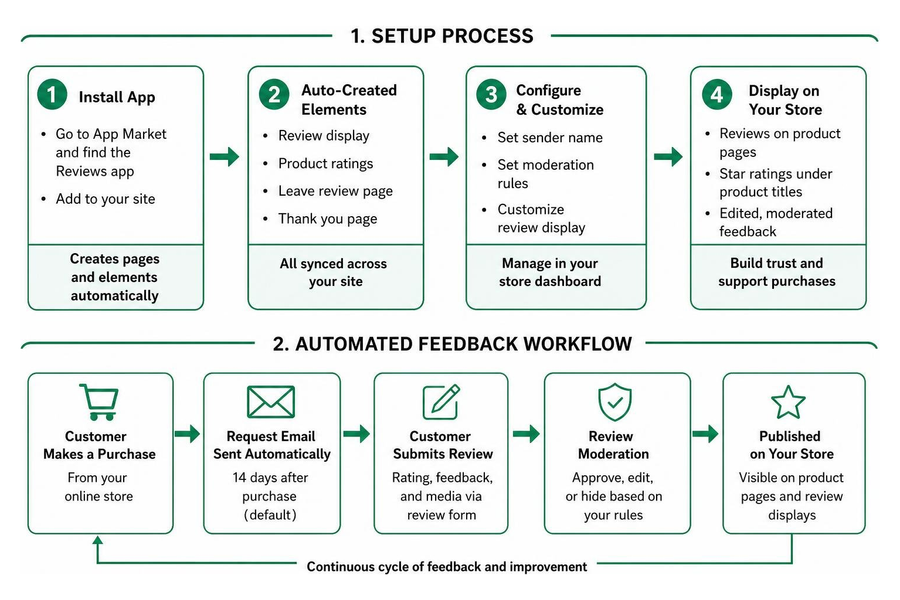
Official Wix Customer Reviews App Features and Setup
To install the native review tool, navigate to the Wix App Market inside your dashboard or editor and search for the app. Adding the application creates the required pages and review elements automatically.
Once installed, managing your feedback happens directly within your store dashboard under the Reviews section. From here, you can oversee submissions, set up moderation rules, and configure your sender name for communications.
For brands looking to adjust layout styles, typography, and spacing, applying tailored Wix website customization ensures that review elements match the visual aesthetics of the rest of your store.

If you are migrating from another e-commerce platform, the app allows you to import product reviews collected elsewhere via CSV, preserving your existing social proof without starting from zero.
Customizing Display, Design, and Review Request Automations
Collecting reviews requires minimal friction for your buyers. The native system features built-in automation that sends review request emails 14 days after an order is placed. This buffer gives customers ample time to receive, unbox, and experience the product.
You can customize the automation schedule, adjust the email template with dynamic placeholders (such as the customer's name and purchased item), or manually trigger review requests for specific high-value orders directly from the dashboard.

In the editor, you can customize the review form states (regular, hover, and error) to ensure an intuitive user experience. You can also customize or remove the star rating element on specific catalog pages if you prefer a more minimalist layout.
Top Wix Customer Reviews App Solutions Compared
Different business models call for different review architectures. While a dedicated storefront benefits from item-specific ratings, service businesses in Henderson, Pahrump, or Centennial Hills often rely on localized feedback left on Google Business profiles.
The official Wix Reviews app holds an average rating of 3.5 out of 5 stars across 63 reviews on the App Market (with roughly 43% 5-star ratings and 22% 1-star ratings). It offers native dashboard controls and supports 19 languages, including English, Spanish, French, Japanese, and Vietnamese.
Here is how the leading options compare:
| Feature / Metric | Official Wix Reviews | Elfsight All-in-One Reviews | Google Reviews (MarketPushApps) | Reviews Widget (Beaver Codes) |
|---|---|---|---|---|
| App Market Rating | 3.5 / 5 (63 reviews) | 4.8 / 5 (10,000+ reviews) | 4.8 / 5 (3,462 reviews) | High rating / Lightweight |
| Primary Use Case | Native e-commerce product reviews | Aggregating external platforms | Displaying Google Business profile reviews | Fast, zero-API manual review cards |
| Supported Sources | On-site buyer submissions | 30+ sources (Google, Yelp, Facebook, Amazon) | Google Business Profile | Handpicked manual entries |
| Automated Request Emails | Yes (Default 14 days) | External platform dependent | Optional follow-ups | No (Manual entry) |
| Rich Snippets Support | Native Schema integration | Yes (Aggregate Rating Schema) | Widget-dependent | Manual Schema |
| Starting Price | Free with Wix Stores | Free tier available / Paid Pro tiers | Free tier available / $2.99–$7.49/mo | Free tier / $16–$20/mo |
Third-Party Wix Customer Reviews App Alternatives
If your customer feedback lives across multiple channels, third-party widgets provide flexible aggregation options.
The Google Reviews widget by MarketPushApps holds a 4.8-star rating from over 3,400 store owners. It lets you embed verified Google reviews directly onto high-traffic pages, such as landing pages or checkout paths, with unlimited page views across its pricing plans ($2.99 to $7.49 per month).
For site owners looking for minimal script overhead, the Reviews Widget provides a zero-API alternative. Instead of pulling live feeds from external APIs that can introduce slight latency, it allows you to handpick and manually curate testimonials inside sleek card sliders. This keeps page speeds high while giving you total editorial control over the displayed text.
Deploying these tools effectively on an optimized Wix ecommerce site helps turn curious visitors into paying buyers by positioning credibility indicators right next to your call-to-action buttons.
Developer Customization with Velo and Advanced Workflows
When standard widget layouts feel restrictive, custom development opens up endless design possibilities. Wix includes a built-in development environment that allows developers to create bespoke review workflows.
Learning how to use Velo by Wix enables you to connect review submissions directly to custom content collections. By leveraging Wix APIs, you can build tailored review submission modals, create multi-criteria rating forms (such as fit, quality, and delivery speed), or trigger custom SMS and email notifications upon review submission.
This flexibility allows developers to craft interactive review carousels, dynamic filters, and verified buyer badges that integrate seamlessly into complex site layouts.
SEO and Moderation Best Practices for Wix Product Reviews
Customer reviews offer significant search engine optimization benefits by introducing dynamic, user-generated content directly onto static product pages. When search engines crawl your catalog, customer reviews provide fresh, contextually relevant text filled with long-tail search queries.
Understanding the importance of Wix SEO for your website involves implementing structured data correctly. When customer reviews are formatted using Schema.org markup (specifically Product and AggregateRating schemas), search engines can display rich snippets—such as star ratings, review counts, and pricing—directly within search results. These visual enhancements improve organic click-through rates.
To maintain platform integrity and quality standards, follow these moderation best practices:
- Filter Inappropriate Content: Set up automated moderation filters to flag profanity, spam links, or irrelevant text before reviews go live.
- Respond Within 24 Hours: Publicly reply to negative reviews calmly and professionally. Offer direct email resolution channels to turn frustrated buyers into loyal brand advocates.
- Understand Platform Weighting: In review algorithms, recent reviews carry more weight than older feedback. Maintain a continuous flow of fresh submissions via post-purchase automations.
- Avoid Prohibited Practices: Never incentivize reviews with direct payments, post fake feedback, or use forced review pop-ups that degrade mobile usability.
Frequently Asked Questions About Wix Reviews
Can I import existing reviews from other platforms into Wix?
Yes. The official Wix Reviews app allows you to import product reviews using a structured CSV file. This enables store owners migrating from other platforms to bring over historical customer feedback, ratings, reviewer names, and timestamps without losing social proof.
Does the Wix Reviews app support Google rich snippets for SEO?
Yes. The native Wix Reviews app automatically injects Schema.org structured data for product ratings. When search engines index your product pages, they detect the aggregate rating markup, making your products eligible for rich snippet star displays in Google search results.
How do I troubleshoot reviews not displaying on my live site?
If newly submitted reviews or widgets do not appear on your live site:
- Ensure the app elements are added to both desktop and mobile layouts in the Wix Editor.
- Verify your moderation settings in the dashboard to check if reviews are held in a "Pending" queue.
- Check your site automations to ensure the review app is actively connected.
- Publish the site again to clear the CDN cache and push structural changes live.
Conclusion
Building a high-converting online presence requires combining clear branding, fast performance, and indisputable social proof. Whether you choose the native Wix Reviews tool for automated product follow-ups, an Elfsight feed for multi-platform aggregation, or a lightweight Google Reviews widget, displaying genuine customer sentiment is essential for e-commerce growth.
At Quix Sites, based in Las Vegas, NV, we specialize in building custom, high-performance websites on Wix and Shopify. Whether you need custom web design, logo and branding design, or advanced Velo engineering, our team delivers personalized solutions tailored to your business goals. For custom packages, our pricing starts at $1,000, with hourly work available at $150 per hour and rapid delivery times ranging from 3 to 10 business days.
Ready to elevate your online store? Explore how you can boost your store performance with expert ecommerce business solutions and turn your customer feedback into higher conversion rates.
Related guides


Want an expert to look at your website?
Share your website and we'll design a free concept for your new site, with a written quote. No cost, no obligation.
Get your free design concept